What Advanced Inventory actually adds
Advanced Inventory is an add-on for QuickBooks Desktop Enterprise. Intuit lists features like multiple location inventory, bar code scanning, bin or lot tracking, serial or lot numbers, and costing methods such as FIFO or Moving Average Cost (MAC).
- If you are not on QuickBooks Desktop Enterprise, you do not have Advanced Inventory features such as serial or lot number tracking.
- If you are on Enterprise, Advanced Inventory is something you turn on and configure, and it changes how inventory data is captured and reported.
Serial numbers vs lot numbers, you must pick one
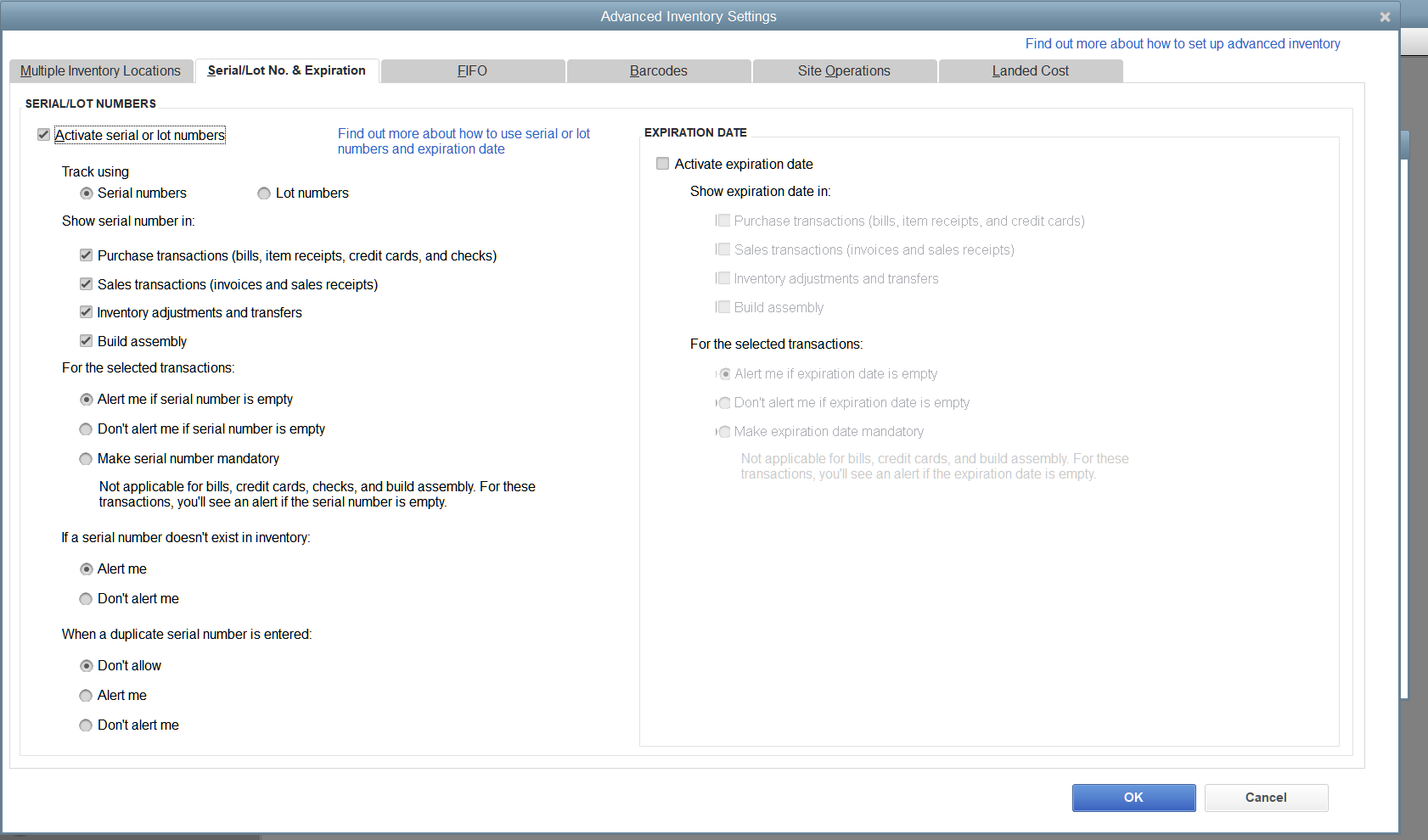
QuickBooks Desktop Enterprise lets you track inventory with serial numbers or lot numbers, and Intuit explicitly says you can only choose one. Pick serial numbers when each unit is unique and you need to know exactly which unit went to which customer. Pick lot numbers when you track batches.
- Serial numbers are for unique units, warranty traceability, and tracking history by serial number.
- Lot numbers are for batches, and you track which batch went out on which transactions.
- Expiration dates exist for specific Enterprise editions and versions, so do not assume every file supports it.
Common serial workflows that work in practice
The core rule is simple: the serial number must be captured on every transaction that moves that unit. Intuit lets you make serial or lot entry mandatory on invoices, sales receipts, item receipts, inventory transfers, and quantity adjustments.
- Sale: create the invoice or sales receipt and select the correct serial number on the line item. This is what creates the customer traceability.
- Return: use a credit memo or refund workflow that references the item and serial number. This keeps the serial number history accurate for warranty and audit.
- Exchange: treat it as two events, a return of the original serial, and a sale of the replacement serial. One combined manual edit usually breaks traceability.
If your staff can bypass serial entry, your reporting becomes a guess. Make serial entry mandatory if the business depends on it.
Where people mess up reporting
- Serial entry is optional: if you do not enforce serial or lot entry, transactions will post without that data and reports cannot magically recover it.
- Returns are posted as journal entries: journal entries do not carry item level detail and will not preserve serial level traceability. Use item based forms.
- Serial numbers are typed inconsistently: if the serial is entered differently each time, searches and reports fragment. This is a process issue, not a server issue.
- Inventory is adjusted without serial detail: if you use quantity adjustments without serial entry, the serial history stops making sense.
If you want a single short rule: item level workflows create item level reporting. General ledger only workflows do not.
Real limits and when QuickBooks Desktop is not enough
QuickBooks Desktop Enterprise with Advanced Inventory supports tracking either serial numbers or lot numbers for an inventory item. In practice, you choose one tracking mode per item, and QuickBooks records history based on that identifier.
If your team needs multi-user access, shared office files, permissions, backups, and day-to-day support around this workflow, that is not just a software choice. It is an environment design choice.
Workaround when you mostly use serials but also need a lot code
If your day-to-day control is serial-based (common for warranty and unit-level tracking) but you still need to carry a lot or batch code, one practical approach is to encode the lot code into the serial value using a strict format. This keeps the data searchable and auditable inside QuickBooks, without claiming native dual-mode tracking.
Recommended format: SERIAL|LOT (use a separator that is not already common in your serials)
- Serial examples:
123-456-789,223-456-789 - Lot examples:
ABC,DEF - Combined values:
123-456-789|ABC,223-456-789|ABC,123-456-789|DEF
What this achieves: you retain unit uniqueness, you can search by serial or by lot (for example, search |ABC), and you keep the lot identifier visible in the same field that QuickBooks is tracking.
What it does not do: this does not become true “serial + lot” dual tracking in QuickBooks. It is a convention. If your business requires strict lot-driven controls (expiry-driven picking, regulated recall workflows, or lot-level compliance reporting), confirm requirements in a sandbox file and consider a dedicated inventory/WMS layer integrated with accounting.
- Rule 1: enforce one pattern and one separator across the company.
- Rule 2: restrict lot characters (A–Z and 0–9) to reduce entry mistakes.
- Rule 3: train staff that serial entries must always include the lot suffix.
References
- Intuit: Turn on Advanced Inventory (feature list)
- Intuit: Use serial or lot numbers and expiration dates
If you want this implemented with tight permissions, disciplined workflows, and clean backups, start with managed Windows Server and QuickBooks Desktop design.
Want this implemented correctly?
We design the server, lock down access, and keep the environment stable. If you want a predictable QuickBooks Desktop setup, talk to us.